2013/03/25

How to Install Appsync in iOS 6.1.2


1. To install Appsync, you have to jailbreak your iPhone first.
2. After the jailbreaking done, open Cydia, tap Source-Edit-Add-add Repo.HackyouriPhone.org-Done
3. Tap Search-Type Appsync-Appsync for iOS 6

4. After you choose, Tap your choice (i.e. Appsync for iOS 6 from Repo.HackyouriPhone.org)-Tap Install in the right above corner, and wait for the installation process to be done.
5. Reboot your iDevice. The you are allowed to install cracked app that you have downloaded.
How to Install Appsync in iOS 6.1.2. Appsync is a tweak that can be downloaded and installed through cydia. The main function of Appsync is enabling the users to install/synchronize cracked app in iPhone, iPad, and iPod with the same quality as AppStore freely. Appsync becomes the most reason to jailbreak the iDevices.
Here are the steps to install Appsync:
Note: Appsync doesn't have icon that appears in your Springboard or Homescreen.

Harlem Shake Video Maker Apps


Apps for Making Harlem Shake Video . Con los teroritas. Do the Harlem Shake! If you often spend your time by  watching videos on YouTube, certainly you know the lyric above. The lyric inspired many people throughout the world to create Harlem Shake videos.
It's a viral that 30-second-videos flood YouTube, since many people interested to make their own Harlem Shake videos and show them to the world. It may be you are one of those who are interested to create Harlem Shake video. If so, you are lucky now, because you can make a Harlem Shake video with a smartphone.
There are some apps that will help you. For Android, you can use Harlem Shake Creator Lite the free version, and Harlem Shake Creator Pro the commercial version for only $1. While for iPhone, you can use  The Harlem Shake.
Those apps will guide you to make a Harlem Shake video. The typical of Harlem Shake is 1 to 15 seconds there will be one person dancing alone, while the rest 15 seconds, there people dancing together.
After you finish making your own video, you can upload to YouTube directly from the apps. Happy shaking!

Tips: How to Play Real Racing 3 Without Purchasing Too Much IAP


Tips Cara Main Real Racing 3 Untuk Terhindar Pembelian IAP Berlebihan
I'm sure that now, Real Racing 3 has become the most played game in your device. Once the doors of the App Store and Google Play opened for this game, you must have been very curious and directly tried playing the game to know the graphics quality, gameplay, etc.
Since the game is Freemium, you may encounter some hindrances to go on and start to think "what if I buy IAP to keep playing?". It's not a wrong thing to buy IAP to speed up your carrer in Real Racing 3, but I have some tips to minimize your spending on IAP.
1. Speed vs Acceleration
In the racing world, speed is not the same as acceleration. A car with lower top speed does not mean that it will be defeated by a car with higher top speed. Acceleration is the key to defeat the car with higher top speed.
When you have to choose for the firs time, between Nissan Silvia or Ford Focus, you will automatically make a comparison between the two cars. Most of us, do not think much and decide to choose the car with the higher top speed. That's not wrong. But you have to consider most Track in Real Racing  is full of blind turning that needs a better acceleration to win.
Besides, many racing that relies on initial acceleration to win, like Head to Head,or Drag Race. So, be wise to choose a car and remember that top speed is not everything.
2. Spare Tire
Soon after you play for a while, you will realize that what you have bought earlier needs repairing and servicing. Luckily, in the new version, body repairing does not make you wait, but the service needs 6 hours. It makes you stop playing.
Remember the spare tire principle. Postpone upgrading the car and immediately make a saving to buy the second car that you can use while your first car is being serviced. So that you can continue playing and speed up your career, right? But how to make a saving? Keep reading.
3. Keep on Playing
It's true that car's damage influences the car's stats. Its top speed will be decreasing, so will the acceleration, and the brake will not hold well as usual. But repairing the car will make you wait and stop playing, it means you don't earn money.
Real Racing 3 is all about grinding! So keep on playing, though your car is damaged. You purpose is to make a saving for a new car, right? You don't have to be the first to finish, as long as you reach the finish line, you will earn dollar and XP that will raise your status and you will get more gold coins. 
Real Racing 3 Tips | Screenshot 1
4. Drive Like a Pro
One of the success keys in winning the Real Racing 3 is your skill in overtaking in a turning. You need techniques and skill to drive properly. Break Assist that is set in high mode helps you to focus on directing the car, since you don't have to press brake. But it will not make you win. You have to reduce the Break Assist level and drive as the real racer. Because most track in RR3 is full of turning, you have to take the chance by setting the car less slow in the turning.
It means that you have to press the brake manually. But don't worry, your car remains fast in the turning and is able to catch up with other cars.
5. Discount Hunter
Real Racing 3 sometimes offers discount for car purchasing. Prepare yourself by saving your money. In every racing tier, usually there are 4 types of cars.For instant, in the lowest tier you choose Nissan Silvia, Ford Focus, Dodge Challenger R/T, and BMW 1 Series M Coupe. Certainly you want to buy a better car, and the good news is, when you rarely win the race as the 1st, 2nd, 3rd winner, the game will randomly offer a car purchasing with discount. Real Racing 3 Tips | Screenshot 2
6. Upgrade as Necessary
Upgrading the car is not cheap. Imagine that you have five cars, how much you have to spend for upgrades?
Invest the maximum upgrade for the best cars. But it you are frustrated because you can't win the race all the times, upgrade the Drivetrain sector. It will help you and is not too expensive.
7. Expand your Social
With Shifted Multiplayer feature, you can race against your best friend from Game Center or Facebook. The interesting part is, each time you defeat you friends you will get bonus in various amount of money.
The more friends you defeat in one racing event, the more money you earn.
8. Give Recess to Your Car and Yourself
Real Racing 3 is not meant to race all the times. The cars you use need recess, so do you. When you decide to sleep, start car servicing process. When you wake up in the next morning, your cars are ready to race again. Follow this pattern to avoid waiting too long.

2013/02/17

How to Jailbreak iPhone Using Redsn0w


Redsn0w is a great tool. Even before final version of iOS 6.1 was released, this tool had been able to Jailbreak Tethered in iOS 6.1 Beta version in iDevice A4. If you have upgraded your iPhone 3Gs, 4, iPod 4G to final version of iOS 6.1, you can do Tethered Jailbreaking using Redsn0w; at least it can reduce your Jailbreak addiction while waiting for Jailbreak Evad3rs to be released.
To download iPSW iOS 6.1 file, please follow this link: iOS 6.1 is Breaking iOS 6.O History Record
When iOS 6.1 UnTethered Jailbreak is released, you still have to restore your iPhone through iTunes to clean Tethered Jailbreak (Clean Restore) and you can do Jailbreaking again.
Note: Remember that this tutorial is for iPhone 3Gs, 4 and iPod 4G only.
It is better to backup all of your data through iTunes before you do Jailbreaking. To backup your data through iTunes, follow the steps below:
  1. Connect your device to PC/laptop and open iTunes
  2. Let iTunes detect your device
  3. Right click on your device in the left sidebar of iTunes
After you backup your data, follow the steps below to do iOS 6.1 Tethered Jailbreak:
Step 1: download Redsn0w 0.9 15b3 for Windows/Redsn0w 0.9 15b3 for Mac (Win / Mac)
Step 2: run Redsn0w by right clicking and ‘Run as Administrator’
Step 3: before you do Jailbreaking, it is better to position your device in DFU Mode, to enter DFU Mode, please follow the link below
How to Enter DFU Mode Using Redsn0w
How to Enter DFU Mode in Iphone, iPad, iPod Manually
Step 4: click ‘Jailbreak’ button
Step 5: click ‘next’
Step 6: if your iPhone is in DFU Mode, you can skip this step and your iPhone will be directly exploited by LimeRa1n. To enter DFU Mode, follow the steps given.
  1. Hold down the Power button for 3 seconds.
  2. Without releasing the Power button, also hold down the Home button for 10 seconds
  3. Without releasing the Home button, release the Power button BUT KEEP holding the Home button for 15 seconds.
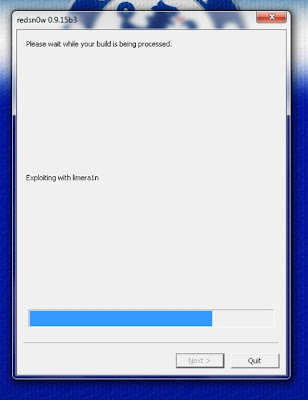
Step 7: Redsn0w will Exploit your device with LimeRa1n and then it will ‘prepare the Jailbreak data’.
Step 8: don’t forget to check ‘Install Cydia’
Step 9: your iPhone will reboot and start ‘uploading the new RAM Disk and Kernel’
Step 10: if the process finishes, Redsn0w will notify. Congratulation, your iPhone is Jailbroken.
Since the Jailbreak is Tethered, you have to do JustBoot in iPhone 3Gs, 4, iPod 4G to turn it on.

How to Enter DFU Mode in iPhone, iPad and iPod Manually


How to Enter DFU Mode in iPhone, iPad and iPod Manually. Usually DFU Mode becomes necessary when you intend to Restore iPSW in iDevice or to Jailbreak your device using Redsn0w or Sn0wBreeze, except you use Absinthe, you won’t need to enter DFU Mode.
DFU (Device Firmware Upgrade) Mode is a state that you can put your iPhone into where it can interface with iTunes but does not load the iPhone operating system or boot loader (this is what really differs DFU mode from recovery mode). iDevices in DFU mode have dark screen but not off.
To enter DFU Mode, follow the steps below:
Step 1: connect your device to PC/laptop using USB cable and open iTunes
Step 2: make sure that iTunes detects your device.
Step 3: hold down the Power button for 3 seconds
Step 4: hold down the Power button once more for 3 seconds, wait for the Apple logo appears.
Step 5: Without releasing the Power button, also hold down the Home button for 10 seconds
Step 6: after the screen blinks and Apple logo disappears, release the Power button without releasing the Home button for 10-15 seconds, until your device is detected by iTunes in Recovery Mode.
Step 7: if you follow the steps properly, your iPhone/iPad/iPod screen will be dark, but if you fail, there will be iTunes logo and USB appear on the screen.
Step 8: to get out of DFU Mode, you just have to hold down the Power button and Home button concurrently until Apple logo appears on the screen.
Done :D

How to Enter DFU Mode Using Redsn0w


DFU Mode is a necessary state to Restore or Jailbreak using certain tool like Redsn0w. if you find difficulties entering DFU Mode manually, follow the step below to enter DFU Mode manually:
Redsn0w is multi functions tool, such as Jailbreak, Upgrade iOS Preserve Baseband  for iPhone SU and guide you to bring your iPhone, iPad, and iPod into DFU Mode. Here, I talk about DFU pwnd function or entering DFU Mode. Differs from other tools (like Absinthe), Redsn0w only has one button, namely Jailbreak.
I suggest you to enter DFU Mode first, before you Jailbreak your iPhone using Redsn0w or Sn0wBreeze, in order to make the Jailbreak or Restore process easier. Most Restore process failures happen because the iPhone is not in DFU Mode.
Entering DFU Mode Using Redsn0w
step 1: download Redsn0w here Redsnow 0.9.15b3 for Windows – Redsnow 0.9.15b3 forMac.
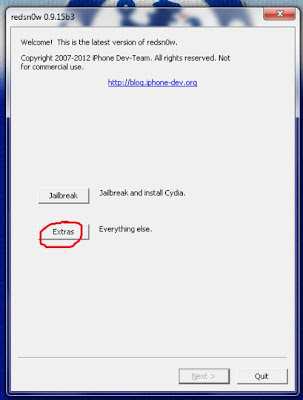
Step 2: open Redsn0w and click ‘extras’
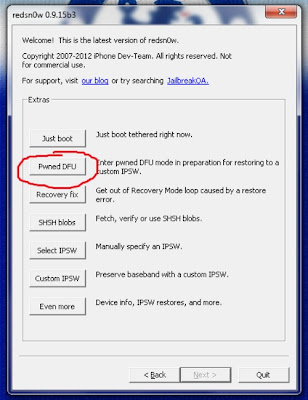
Step 3: click pwnd DFU
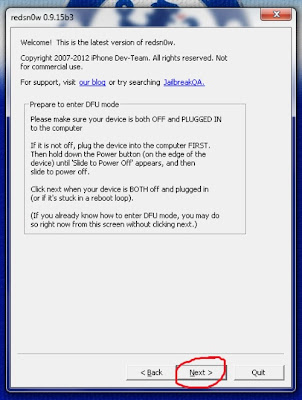
Step 4: click ‘next’
Step 5: this step is very important, please be careful in following the instructions given to enter DFU Mode successfully.
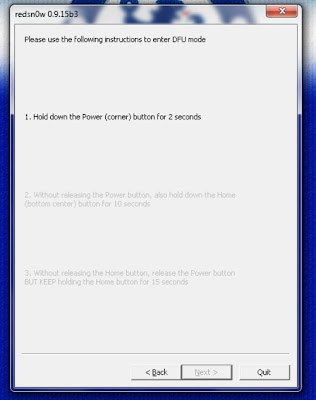
  1. Hold down the Power button for 3 seconds.
  2. Without releasing the Power button, also hold down the Home button for 10 seconds
  3. Without releasing the Home button, release the Power button BUT KEEP holding the Home button for 15 seconds.
Step 6: if you follow the steps properly, Redsn0w will automatically Exploit your iPhone using LimeRa1n.
step 7: Now your iPhone is in DFU Mode and ready to be Jailbroken or Restored.

Things Apple and Google Do to Make Innovations


ipad miniThings Apple and Google Do to Make Innovations. Apple is said as the most innovative company in 2012 according to a survey conducted by Booz & Company, a managing consultant company from U.S.
The finding of the survey which was conducted to 1000 companies was released in a journal under the title “Global Innovation 1000 Reports”. The journal listed a number of innovative companies throughout the world during 2012.
After Apple, Google was in the second rank, followed by 3M, Samsung, GE, Microsoft, Toyota, P&G, IBM, and Amazon.
Besides listing the innovative companies, through the survey Booz also studied how the successful companies would create various innovations of products and services.2. Google
According to Businessinsider, the things innovative companies do to gain success based on the survey are like below:
At innovative companies, everybody is an innovator. The employees are believed as creative people. Their working environments are comfortable, they are embraced and respected, and they are trusted to make innovation.
By keeping the creative culture in working environment, the innovative companies would develop ideas and creating new useful products.
Innovative companies measure their idea-generation success. Companies that value innovation measure how many ideas they generate to be executed and developed as real products.
Booz’s survey findings are surprising. It shows that smaller companies tend to execute their ideas more bravely. The small companies have fewer employees, but they are more skillful because they have less bureaucracy.
Innovative companies change the idea a lot before it becomes a product. Creating innovation is not as fast as blinking eyes. Innovation is not all about generating new ideas, but also deciding the best idea.
There are steps to get through to turn ideas into real products; they are research, trial, and asking feedback to customers. Those steps are obligatory to follow.
In short, innovative companies test their ideas with customers, employees, and their partners. The successful innovations have to fulfill things needed by the customers with new things.
Innovative companies have a person which is responsible for finding new ideas. Sergey Brin as the example, he is Google’s ‘ideas czar’. He is responsible for the Google X project, a facility built by Google to conduct researches and develop forthcoming technologies.
Innovative companies find ideas everywhere. They don’t care if the ideas come from inside the company or outside. They also talk to their customers and clients directly and indirectly for the sake of getting ideas.
Innovative companies realize that great products can be created by knowing the customers well. To create innovation, acquisitions can be such a good way, so do entering the new market, and hiring creative entrepreneurs.
Innovative companies spend R&D money thoughtfully, not profligately. The ten innovative companies mentioned above do not spend most on R&D. only three of them — Toyota, Microsoft, and Samsung — are among the companies with the biggest R&D budgets, as listed in this chart from Booz.
Innovative companies systematically create new ideas. Any companies could create great ideas, but to create bright ideas continuously, a company needs a system in creating ideas to decide which one to be executed, and ask the feedback about the ideas.