2013/04/19

Facebook Gives iOS a Homey Touch


Facebook Gives iOS a Homey TouchChat Heads and Stickers aren't just for Android phones anymore. Those features of Facebook's new Home family of networking apps are now available for iPhones and iPads, thanks to an iOS update released by the social network. However, those are just about the only Home features to make it to Apple, which may be signaling that it knows it has to keep its signature smartphone relevant in an increasingly competitive marketplace.
Facebook on Tuesday released an update to its Apple iOS app that includes just a few of the features in its Home suite of mobile social networking apps recently unveiled for Android users.
iOS users can now refresh their Facebook app to include Chat Heads, the network's new messaging feature that makes short texts more personal by planting a tiny bubble with the picture of the person who is messaging next to the text. The image pops up on a smartphone or tablet screen when someone receives a message.
The update will also bring what Facebook calls "Stickers," or cartoon emoticons, to its iOS app. iPad users will also notice a change in their NewsFeed layout, which Facebook said was designed to make the page less cluttered. The change allows users better options for choosing what they want to see on their feeds.
Apple did not respond to our request to comment for this story.

Bringing Home to Other Platforms

The ability to put even a few of its new Facebook Home features into Apple's mobile operating system is a win for the social giant, said Rob Enderle, principal analyst at Enderle Group. That's especially true because the mobile software is still new and subject to tweaking.
"Clearly iOS is one of the major platforms, so it's incredibly important for Facebook to get on there, but Facebook Home clearly needs some more work," he told MacNewsWorld. "It's so much of the Facebook experience, and it needs to embrace some other part of the phone and its services. The number of people that can actually live on Facebook and in that service is getting pretty small these days."
Given that, it's surprising that Apple let the social network infiltrate iOS as much as it did with the Facebook Home updates, Enderle added.
"Apple has got some pretty strict restrictions about taking away from the user experience," he noted. "It seems unlikely that they're going to let Facebook do what it needs to do to develop this. Jobs would have had a cow with them even doing this much."
Even if Apple doesn't let Facebook develop its new Home features any further in iOS, it is an indication that Apple's short-term mindset is to create some buzz around its devices.
"This is a case where Apple is getting a little desperate," Enderle said. "Their numbers are off, and they're trying to get their phones to look trendier. But I don't think it's going to let Facebook do what it needs to do and run off with control."

Next iPhone Generation on the Way?

It's unknown exactly when Apple will launch its next-generation iPhone, but according to some reports the newest addition could be on its way sooner rather than later.
Foxconn recently ramped up hiring, according to a report from The Wall Street Journal,. That could indicate the factory is gearing up for a launch.
Just because the supply chain might be getting into motion doesn't mean Apple's newest iPhone is right around the corner, said Colin Gibbs, analyst at GigaOm Pro. However, it could mean that the company understands the marketplace is getting more crowded, and a launch slightly ahead of its typical annual release cycle might help Apple.
"The smartphone wars are escalating once again, with new high-end models from Samsung and HTC coming to market, so if there are no hiccups in the supply chain I think we could see a new iPhone in July or August," he told MacNewsWorld.
In addition to a new iPhone model, reports from several analysts -- most recently Piper Jaffray's Gene Munster -- have suggested that the company will indeed launch a low-cost smartphone that could help it capture a larger chunk of the overall marketplace.
Munster said Apple will release a US$300 non-subsidized model targeted toward emerging markets. A phone possibly made of plastic instead of glass, and missing standard display specs, would likely be a hit in several countries overseas, Gibbs said, even if it doesn't debut in more premium markets.
"I think there's a good chance Apple finally comes to market with a more affordable iPhone this year, too," he added. "We'll continue to see explosive growth in emerging markets like China and India, and without a cheaper iPhone Apple can't fully compete in those regions."

2013/03/27

Mysterious One-Million-BlackBerry Z10 Buyer Revealed


The mystery of 1 million BlackBerry Z10 buyer finally is revealed. This is the biggest single order ever in BlackBerry's sales history. A credible source says in AllThingsDigital that the mysterious buyer is the Brightstar distributor that is based in Miami, US.
Brightstar provides various service for cellular operators, producers, and retailers in some countries. The major of the business is to officially control the supply chain to the retailers and big store. One of the cellular operator using Brightstar's service is Verizon Wireless.
The one-million-order itself certainly is a good news to BlackBerry. The BlackBerry EVP Global Sales, Rick Constanzo says that the one-million-order will increase people's trust to BlackBerry 10.
Brightstar will convince their partners and consumers to buy the Blackberry's latest product. Then Z10 which carries BlackBerry 10 OS will compete with other smartphones that carry Android, Windows Phone, even iOS.
 

Carries iOS, Apple iWatch Launched By the End of 2013


Smartwatch from Apple is certainly not only a rumor. The latest news confirmed that Apple iWatch is going to carry iOS, just like iPhone and iPad.
Apple's target is to launch the smartwatch by the end of this year. Now, Apple is still perfecting the battery resistance. According The Verge, after being fully charged, the iWatch prototype only resists for few days. Apple want iWatch to resist for more days, at least for 4 to 5 days.
The way Apple determines the operating system of this watch is very interesting, since Apple decides iOS for the watch that is made of curved glass.
Previously, Apple has tried to use mobile OS that is similar to iOS in iPod nano the sixth generation. The reason to choose the OS is because it is lighter and simpler, but it has some limitations compared to iOS.
If it's true, Apple's decision to use iOS in iWatch will benefit Apple, developer, and the users. Because Apple does not have rebuild the apps for iWatch, since they have been already available for iPhone and iPad.
It seems that Apple's decision to perfect the battery resistance and postpone the launch of this smartwatch is right step, since it will be uncomfortable to recharge the watch everyday.
Besides the battery, Apple also have to work hard to build the right stream in scanning information and notification between iPhone and iWatch. Of course Apple has thought about those things over, it is proven by the number of employee working on iWatch, there are about 100 employees.

2013/03/25

Tips to Extend iOS 6 iPhone Battery


Tips to Extend iOS 6 iPhone Battery. Many iPhone users complained about the batteries that do not last for long time. It is still unclear if this issue caused either by bugs or the iOS 6. Many possibilities causing the battery does not last for long time, such as the intensity of iPhone using, the almost worn-out battery, and jailbreaking. Here are tips to extend your iPhone battery:

1. Turn on Auto-Brightness
Find it in the Settings app -> Brightness & Wallpaper -> Auto-Brightness On

2. Reduce Screen Brightness
Find it in Settings -> Brightness & Wallpaper

Find it in Settings -> Brightness & Wallpaper

3. Turn Bluetooth Off
Find it in Settings -> Bluetooth -> Move Slider to Off

4. Turn Off 3G/4G
Find it in Settings -> General -> Cellular -> Slide Enable 3G to Off on some models or Enable LTE to Off

5. Keep Wi-Fi Off
Find it in Settings -> WiFi -> Slide to Off

6. Turn Off Location Services
Find it in Settings -> Privacy -> Location Services -> Slide to Off

7. Turn Data Push Off
Find it in Settings -> Mail, Contacts, Calendar -> Fetch New Data -> Slide to Off

8. Fetch Email Less Often
Find it in Settings -> Mail, Contacts, Calendar -> Fetch New Data -> Select Your Preference

9. Auto-Lock Sooner
Find it in Settings -> General -> Auto-Lock -> Tap your Preference

10. Turn off Equalizer
Find it in Settings -> Music -> EQ -> Tap off

11. Do Less-Battery-Intensive Things
Browsing the web, games, and movies are the things that suck the most battery, avoid those things.

12. Sleep and Wake Less
Since putting your iPhone to sleep and wake will drain  your battery, avoid this.

13. Buy an Extended Life Battery
Do this in case the other tips do not work.

14.Turn Off Other Location Settings
Find it in Settings -> Privacy -> Location Services -> System Services -> Turn off Diagnostics & Usage, Location-Based iAds, and Setting Time Zone


How to Install Appsync in iOS 6.1.2


1. To install Appsync, you have to jailbreak your iPhone first.
2. After the jailbreaking done, open Cydia, tap Source-Edit-Add-add Repo.HackyouriPhone.org-Done
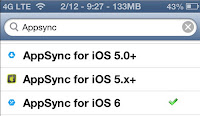
3. Tap Search-Type Appsync-Appsync for iOS 6

4. After you choose, Tap your choice (i.e. Appsync for iOS 6 from Repo.HackyouriPhone.org)-Tap Install in the right above corner, and wait for the installation process to be done.
5. Reboot your iDevice. The you are allowed to install cracked app that you have downloaded.
How to Install Appsync in iOS 6.1.2. Appsync is a tweak that can be downloaded and installed through cydia. The main function of Appsync is enabling the users to install/synchronize cracked app in iPhone, iPad, and iPod with the same quality as AppStore freely. Appsync becomes the most reason to jailbreak the iDevices.
Here are the steps to install Appsync:
Note: Appsync doesn't have icon that appears in your Springboard or Homescreen.

Harlem Shake Video Maker Apps


Apps for Making Harlem Shake Video . Con los teroritas. Do the Harlem Shake! If you often spend your time by  watching videos on YouTube, certainly you know the lyric above. The lyric inspired many people throughout the world to create Harlem Shake videos.
It's a viral that 30-second-videos flood YouTube, since many people interested to make their own Harlem Shake videos and show them to the world. It may be you are one of those who are interested to create Harlem Shake video. If so, you are lucky now, because you can make a Harlem Shake video with a smartphone.
There are some apps that will help you. For Android, you can use Harlem Shake Creator Lite the free version, and Harlem Shake Creator Pro the commercial version for only $1. While for iPhone, you can use  The Harlem Shake.
Those apps will guide you to make a Harlem Shake video. The typical of Harlem Shake is 1 to 15 seconds there will be one person dancing alone, while the rest 15 seconds, there people dancing together.
After you finish making your own video, you can upload to YouTube directly from the apps. Happy shaking!

Tips: How to Play Real Racing 3 Without Purchasing Too Much IAP


Tips Cara Main Real Racing 3 Untuk Terhindar Pembelian IAP Berlebihan
I'm sure that now, Real Racing 3 has become the most played game in your device. Once the doors of the App Store and Google Play opened for this game, you must have been very curious and directly tried playing the game to know the graphics quality, gameplay, etc.
Since the game is Freemium, you may encounter some hindrances to go on and start to think "what if I buy IAP to keep playing?". It's not a wrong thing to buy IAP to speed up your carrer in Real Racing 3, but I have some tips to minimize your spending on IAP.
1. Speed vs Acceleration
In the racing world, speed is not the same as acceleration. A car with lower top speed does not mean that it will be defeated by a car with higher top speed. Acceleration is the key to defeat the car with higher top speed.
When you have to choose for the firs time, between Nissan Silvia or Ford Focus, you will automatically make a comparison between the two cars. Most of us, do not think much and decide to choose the car with the higher top speed. That's not wrong. But you have to consider most Track in Real Racing  is full of blind turning that needs a better acceleration to win.
Besides, many racing that relies on initial acceleration to win, like Head to Head,or Drag Race. So, be wise to choose a car and remember that top speed is not everything.
2. Spare Tire
Soon after you play for a while, you will realize that what you have bought earlier needs repairing and servicing. Luckily, in the new version, body repairing does not make you wait, but the service needs 6 hours. It makes you stop playing.
Remember the spare tire principle. Postpone upgrading the car and immediately make a saving to buy the second car that you can use while your first car is being serviced. So that you can continue playing and speed up your career, right? But how to make a saving? Keep reading.
3. Keep on Playing
It's true that car's damage influences the car's stats. Its top speed will be decreasing, so will the acceleration, and the brake will not hold well as usual. But repairing the car will make you wait and stop playing, it means you don't earn money.
Real Racing 3 is all about grinding! So keep on playing, though your car is damaged. You purpose is to make a saving for a new car, right? You don't have to be the first to finish, as long as you reach the finish line, you will earn dollar and XP that will raise your status and you will get more gold coins. 
Real Racing 3 Tips | Screenshot 1
4. Drive Like a Pro
One of the success keys in winning the Real Racing 3 is your skill in overtaking in a turning. You need techniques and skill to drive properly. Break Assist that is set in high mode helps you to focus on directing the car, since you don't have to press brake. But it will not make you win. You have to reduce the Break Assist level and drive as the real racer. Because most track in RR3 is full of turning, you have to take the chance by setting the car less slow in the turning.
It means that you have to press the brake manually. But don't worry, your car remains fast in the turning and is able to catch up with other cars.
5. Discount Hunter
Real Racing 3 sometimes offers discount for car purchasing. Prepare yourself by saving your money. In every racing tier, usually there are 4 types of cars.For instant, in the lowest tier you choose Nissan Silvia, Ford Focus, Dodge Challenger R/T, and BMW 1 Series M Coupe. Certainly you want to buy a better car, and the good news is, when you rarely win the race as the 1st, 2nd, 3rd winner, the game will randomly offer a car purchasing with discount. Real Racing 3 Tips | Screenshot 2
6. Upgrade as Necessary
Upgrading the car is not cheap. Imagine that you have five cars, how much you have to spend for upgrades?
Invest the maximum upgrade for the best cars. But it you are frustrated because you can't win the race all the times, upgrade the Drivetrain sector. It will help you and is not too expensive.
7. Expand your Social
With Shifted Multiplayer feature, you can race against your best friend from Game Center or Facebook. The interesting part is, each time you defeat you friends you will get bonus in various amount of money.
The more friends you defeat in one racing event, the more money you earn.
8. Give Recess to Your Car and Yourself
Real Racing 3 is not meant to race all the times. The cars you use need recess, so do you. When you decide to sleep, start car servicing process. When you wake up in the next morning, your cars are ready to race again. Follow this pattern to avoid waiting too long.